Software development turns a business need into a system that people can use, check and improve. It may be a customer portal, administration dashboard, booking system or a website with specialised features. The work includes understanding the process, organising data, programming, testing and support after launch.
If you are looking for software development in Albania, the first question should go beyond the technology used to build it. Start with the problem: which task takes too much time, where do errors recur and what should the system do differently? These answers help define the features and budget.
This guide explains the relationship between software and web development, how to organise a project, what affects costs and what to check at handover. To discuss specific requirements, explore custom software development at Vericod.
Software development, web development and website development
Software development covers creating and improving programs. In Albanian, both “zhvillim softueri” and “zhvillim software” are used for this service. The term can include browser-based systems, desktop programs and other applications. The appropriate format depends on the workflow and its users.
Web development concerns websites and applications built with web technologies. A portal where employees manage bookings is software even though it opens in a browser. A presentation website may need fewer functions, but it still requires structure, content and technical checks.
Website development, often searched for as “zhvillim website” or “zhvillim web” in Albania, commonly starts with the public side of a business: services, products and contact information. Adding customer accounts, payments or live availability introduces application rules as well. For the public-facing part, see our business website planning guide.
| Solution | What the user can do | What needs defining |
|---|---|---|
| Presentation website | Understand services and make contact | Content, languages and enquiry forms |
| Web application | Perform tasks within an account | Data, permissions and business rules |
| Internal dashboard | Manage company operations | Roles, reports and change history |
| System integration | Exchange information between programs | Source of truth, synchronisation and failures |
When does custom software make sense?
A custom system can be appropriate when existing tools do not adequately support your workflow. Examples include pricing that depends on several conditions, approvals involving different roles or connections between bookings, stock and invoicing. Not every task requires building a new program.
Before investing, describe how the work happens today. How often is the same information copied? Who corrects mistakes? Do requests get lost between email and spreadsheets? Then describe the intended result with a real example. “I need a modern dashboard” is less specific than “employees should only see bookings for their own branch”.
Consider practical limits too: connectivity at the workplace, available devices, staff experience and time for training. A feature-rich system has limited value if people cannot complete everyday tasks efficiently.
Ready-made software, adaptation or a new build?
A ready-made product may cover standard processes and offer a faster start. Check the demonstration, licence terms and data export options. Review Vericod’s available software to see what could be used without commissioning a new system.
Adapting an existing solution can make sense when the core functionality fits and changes are limited. Check whether future updates will remain compatible with the customisation. A small visual adjustment has different maintenance implications from changing the application’s internal logic.
Building from scratch is an option when requirements differ substantially or integrations require greater control. Compare costs over the expected period of use, including licences, hosting, updates, support and likely extensions. The initial development fee is only one part of that picture.
How to write a project brief that can be estimated
A useful requirement identifies the user, action and result. For example: “The manager creates a booking, chooses a vehicle and dates, and the system checks for conflicts before confirmation.” Then describe what happens if the vehicle is unavailable or the customer changes dates.
Prepare the following before requesting a proposal:
- The problem and the current workflow.
- User roles and the actions each role is allowed to take.
- Main process steps, including exceptions.
- Existing data to import and its condition.
- External programs and services that need connecting.
- Required languages, devices and reports.
- Acceptance criteria showing that a feature works correctly.
Use anonymised sample data in early discussions. Assessing a form does not require sharing real customer lists. Technical documentation and access arrangements can be addressed later according to the project.
Clear acceptance criteria also reduce uncertainty. “Generate a monthly report” leaves open which date is used, which records are included and how cancelled transactions appear. A sample report with defined fields is easier to estimate and verify.
Development stages: from analysis to launch
Analysis clarifies requirements and boundaries. A prototype demonstrates the screen flow before full implementation. At this stage, check whether users can find the necessary action and whether the steps match their everyday work.
Development builds the features and their connections to data. Agree on demonstrations at defined intervals. Leaving all assessment until the final day increases the chance that a misunderstood rule will affect several parts of the system.
Testing and business acceptance then take place in a separate test environment. Launch needs a plan for data, user accounts, checks after the switch and a return to the previous version if something fails. Each milestone should produce a verifiable result rather than only a general percentage of completion.
For example, a booking milestone can be accepted when staff can create, amend and cancel bookings under the agreed rules. A screen that looks finished is not evidence that all of these actions work.
What should the first version include?
An MVP is an initial version with enough functionality to test the central workflow with its intended users. It does not mean omitting security, data integrity or steps required to make that workflow usable.
For a request management system, the first version might include creating a request, assigning responsibility, changing its status and searching the list. More detailed reporting can follow once actual usage is understood. However, users seeing another customer’s information without permission is a problem to address from the start.
Separate requirements into essential, useful and later additions. This makes the budget easier to manage and allows the core workflow to be tried in real work without waiting for every possible idea.
Record which assumptions the first release is intended to test. If the main uncertainty is whether staff will use a shared task list, developing numerous report variations before trying the list may add cost without resolving that uncertainty.
Integrations: making two systems work together
An API enables information exchange, but its existence does not define the business process. Decide which system holds the authoritative record and how changes are handled. For example, does the warehouse or the online shop control stock levels?
Ask about documentation, usage limits, a test environment and third-party charges. Define what happens when a connection fails or a response arrives late. Retrying an action should not accidentally create duplicate orders or records for the same operation.
For payments, the browser response alone should not be treated as the only evidence of completion. Confirmation and reconciliation need to follow the provider’s documentation. Merchant account approval and provider fees are separate from programming the integration.
Also decide how failures become visible to staff. A silent integration error can leave two systems showing different information. A clear exception queue or alert process helps the responsible person investigate without repeating transactions blindly.
A practical example: car rental web development
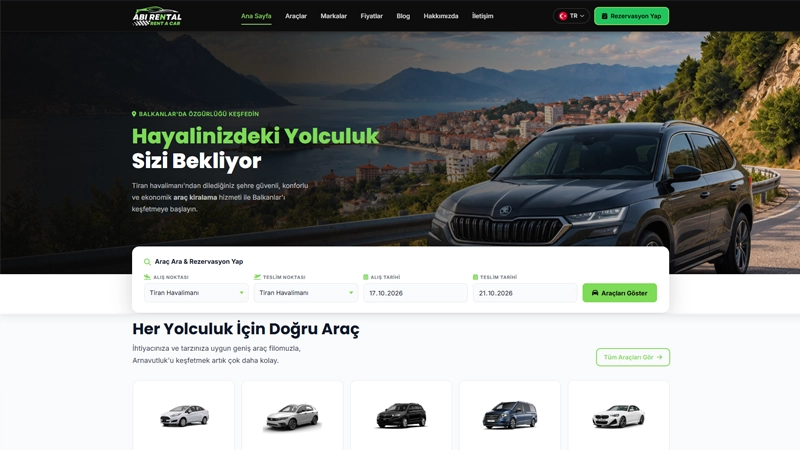
A rental website can display vehicles and collect enquiries. A broader system also needs to coordinate dates, times, vehicle status and booking changes. Those rules affect the database and administration workflow as well as the public form.
Suppose a vehicle is being serviced but still appears available. If blocking it is not part of the workflow, an attractive calendar cannot prevent the error. Likewise, changing booking dates needs to trigger the relevant conflict and price checks under the agreed rules.
This is an illustrative example, not a claim that every product includes all these features. For a specific assessment, read how to choose car rental software and check the listed features of Vericod’s car rental product.
Plan security and data handling from the start
Define the data needed and who may view, change or export it. Hiding a button does not replace server-side permission checks. Test boundaries between roles and accounts, rather than only checking that password login works.
The project should address input validation, sessions, secret storage and appropriate event logging. Logs should not become an unnecessary store of passwords or sensitive information. OWASP ASVS can provide a reference for structured application security requirements.
Decide what is backed up, how often and how restoration will be tested. Files without the database may not be enough to restore an application. For infrastructure considerations, see our guide to choosing web hosting.
Security responsibilities continue after launch. Clarify who applies updates, checks failed jobs and responds to incidents. A technically sound first release still needs appropriate ongoing operation.
Website development and SEO: public pages and private tools
Public service pages need understandable content, descriptive titles and useful links. On a multilingual website, each language version needs its own content and URL, with correct links between equivalents. Translating the navigation alone does not translate the whole website.
Private dashboards and customer records have a different purpose and need access protection. Excluding a page from search results is not access control. A URL absent from Google can still be publicly accessible if the server does not verify permissions.
Google’s SEO Starter Guide discusses useful content and clear organisation. Technical development supports access to and use of that content; search rankings also depend on other factors and are not guaranteed by choosing a particular technology.
Decide early which parts of an application should be discoverable. A public product page may need an indexable URL, while account-specific pricing and documents require authenticated access. Treating these as separate requirements avoids confusing visibility with security.
Testing that shows whether the system is ready
Set an acceptance example for every important function. If the requirement says only managers can change prices, test an unauthorised user attempting that change too. If a booking cannot be confirmed, the system should explain the result without leaving records in an ambiguous state.
Pay particular attention to:
- The normal workflow and missing or invalid information.
- Two users making changes at the same time.
- Business-specific dates, times, currencies and languages.
- Email delivery failures or unavailable external services.
- The accuracy of imports, exports and reports.
- Backup restoration and the move from the test environment.
Use data and workload representative of actual operations. A screen containing five rows does not show how search will behave after thousands of records have accumulated. Testing should focus on meaningful business risks, not merely how many checks can be listed.
What affects software development cost and timelines?
Cost reflects the complexity of business rules, integrations, data quality, user roles and required testing. Screen count is only a rough indicator. A single booking screen may contain more logic than several presentation pages combined.
Ask the proposal to separate analysis, development, migration, testing, training and maintenance. Clarify recurring licences, hosting and external service costs. Evaluate extra features together with their effect on delivery dates and existing functionality.
Timelines also depend on business decisions and materials. Missing API documentation, delayed approvals or data cleaning can block particular stages. A credible plan identifies dependencies and milestone outcomes as well as a completion date.
Agree how changes will be recorded. When a new requirement appears, establish its scope, estimate and acceptance criteria before treating it as part of the original delivery. This makes decisions visible to both the business and development team.
Handover, ownership and maintenance
Before agreeing to a project, clarify usage rights, source-code access under the contract and third-party licences. Data ownership, export and the ability to change providers should be discussed explicitly.
Handover should include administration instructions, responsible accounts, configuration details and the incident process. Business continuity should not depend on one person holding every login. Define the distinction between fixing delivered functionality and developing new features.
For the operating environment, consider Vericod web hosting while checking the application’s actual requirements. Choose the package and management responsibilities according to workload and technology, not disk space alone.
Review the system after it has been used in practice. Staff feedback, recurring errors and processing times can identify the next improvements more reliably than adding features simply because they are available.
Frequently asked questions about software and web development
Can an existing program be extended?
Often yes, after reviewing the code, licence, documentation and data. First assess whether changes can preserve existing functionality. Integrating or replacing one module may sometimes be more reasonable than rebuilding the whole system.
Do I need a mobile app or a web application?
That depends on devices, connectivity and required features. A mobile-friendly web application can suit many workflows. Offline work or specialised device features require a closer assessment before choosing the approach.
Which technology is best?
There is no single choice for every project. Assess requirements, integrations, the operating environment and maintainability. Ask why a technology is proposed and how the system will be supported later.
Is data migration included?
Only if it is part of the proposal. Define sources, fields, duplicates and post-import checks. Test before the final switch, with a plan for changes made in the old system during the transition.
Does software automatically improve productivity?
No. Results depend on the process, adoption and training. Measure processing time, errors and repeated manual work before and after introduction. These indicators help establish whether the investment addresses the original problem.
Discuss your project with Vericod
If you need custom software or web development for your business, start with a concrete workflow. Explain how it works today, where the difficulties are and what the first version should enable. If your need is mainly a public website, start with its structure; if it includes operations, define the rules and data too.
Contact Vericod to discuss your project. Prepare the user roles, main features, integrations and required languages. These details provide the basis for a proposal with clear boundaries and development steps that can be reviewed along the way.